
TL;DR: I built a free, open-source Azure DevOps extension that brings AI-powered code reviews to your pull requests using self-hosted Ollama. No API costs, no data leaving your infrastructure, complete control. Version 2.0 now gives the AI way more context - full file content, project metadata, and custom best practices.
Cloud AI Services
I have never been a fan of simply connecting to a random AI API and retrieve the result. I enjoy utilizing own hardware to run the models on.
You also have a bit more privacy by keeping your code in your network. Well, if you run Azure DevOps Services, this is not the case, but still, it does not need to be spread more than necessary.
What's New in v2.0
The biggest update: the AI now gets proper context. Version 1 just sent diffs, which was like asking someone to review code while looking through a keyhole. Now the AI sees:
- Full file content - Not just the changes, but the entire file being modified
- Project metadata - README, package.json, requirements.txt, .csproj files, .sln solutions
- Custom best practices - Define your own team's coding standards and have the AI enforce them
This means the AI understands your project structure, dependencies, and conventions before reviewing. Way better suggestions.
inputs:
  custom_best_practices: |
    Always use async/await instead of .then() for promises
    All public methods must have JSDoc comments
    Database queries must use parameterized statements
    Error messages must be logged with context
The AI will now specifically check for these in your PRs.
How It Works
The extension integrates directly into your Azure DevOps pipeline and automatically reviews pull requests. You can either use yaml or you just use the classic UI.
trigger: none

pr:
  branches:
    include:
      - main

jobs:
- job: CodeReview
  pool:
    vmImage: 'ubuntu-latest'
  steps:
  - task: OllamaCodeReview@2
    inputs:
      ollama_endpoint: 'http://your-ollama-server:11434/api/chat'
      ai_model: 'gpt-oss'
      bugs: true
      performance: true
      best_practices: true
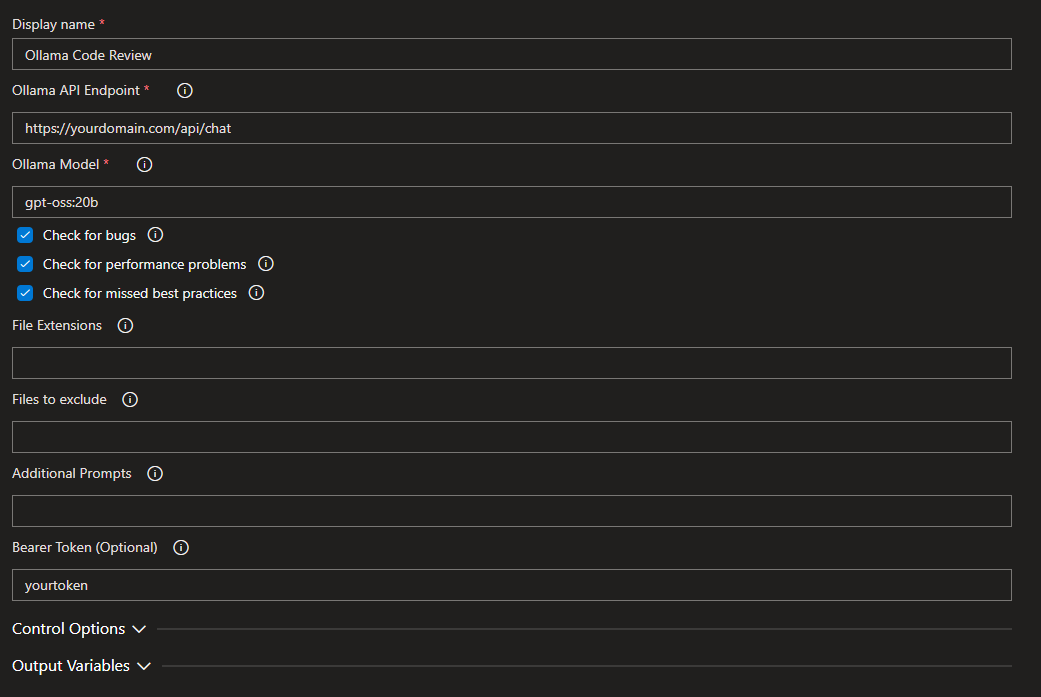
When a developer creates a pull request:
- The pipeline triggers automatically
- The extension fetches changed files plus their full content
- The extension gathers project context (README, dependencies, etc.)
- Ollama analyzes everything for bugs, performance issues, and best practices
- AI-generated comments appear directly on the pull request
Setup
Here's what you need:
Software Stack:
# Install Ollama
curl https://ollama.ai/install.sh | sh

# Pull your preferred model
ollama pull gpt-oss

# That's it for the AI side. For windows you want to download and install Ollama directly.
Optional: Secure it with nginx
If you want to expose Ollama over HTTPS with authentication:
server {
    listen 443 ssl http2;
    server_name ollama.yourdomain.com;

    ssl_certificate /etc/letsencrypt/live/ollama.yourdomain.com/fullchain.pem;
    ssl_certificate_key /etc/letsencrypt/live/ollama.yourdomain.com/privkey.pem;

    location / {
        proxy_set_header Authorization $http_authorization;

        # Bearer token authentication
        set $expected "Bearer YOUR_SECRET_TOKEN";
        if ($http_authorization != $expected) {
            return 401;
        }

        proxy_pass http://127.0.0.1:11434;
        proxy_http_version 1.1;
        proxy_set_header Connection "";
        proxy_buffering off;
    }
}
This way you can expose your API with some security measures (you actually need to do this when running this on Azure Devops Services, not Azure Devops Server).
Multi-Language Support
Version 2 automatically detects your project type and includes relevant context:
- JavaScript/TypeScript - Reads package.json for dependencies and project info
- Python - Includes requirements.txt
- C# - Parses .csproj files, .sln solutions, packages.config
- Java - Detects pom.xml
The AI uses this to understand your tech stack and give better, more relevant feedback.
What It Actually Reviews
The AI checks for:
Well, whatever you tell it to, as you have an additional prompting feature, but overall you can review for:
- Best practices
- Performance
- Bugs
- Custom (own prompt)
- Custom best practices (new!) - Your own team standards
inputs:
  bugs: true
  performance: true
  best_practices: true
  file_extensions: '.js,.ts,.py,.cs'
  file_excludes: 'package-lock.json,*.min.js'
  additional_prompts: 'Check for security vulnerabilities, Verify proper error handling'
  custom_best_practices: |
    Use TypeScript strict mode
    Prefer composition over inheritance
    All API calls must have timeout handling
Getting Started
- Install Ollama on your server
- Pull a model:
ollama pull gpt-oss - Install the extension from Ollama Code Reviewer
- Configure your pipeline with the YAML above or in the UI
- Create a PR and watch the AI review it with full context
Full documentation and source code available on GitHub.
Try It Yourself
The extension is completely free and open-source. No telemetry, no phone-home, no vendor lock-in.
Links:
Have fun.
Disclaimer: I was supported by my AI to write this. Local AI of course. ;)
