
Guide: DeepSeek-V4.1-Flash-1017 on TensorFold, twice as fast on the same two GB10 boxes

A month ago we put DeepSeek-V4.1-Flash on two NVIDIA GB10 desktop boxes (DGX Spark / ASUS Ascent GX10) with vLLM and wrote it up as a guide. Since 20 October the same two boxes serve the newer 1017 release on a different engine, TensorFold, and it is about twice as fast. Same hardware, same weights, same API. This post shows the numbers, the setup, and the two things that bit us on the way.
The numbers
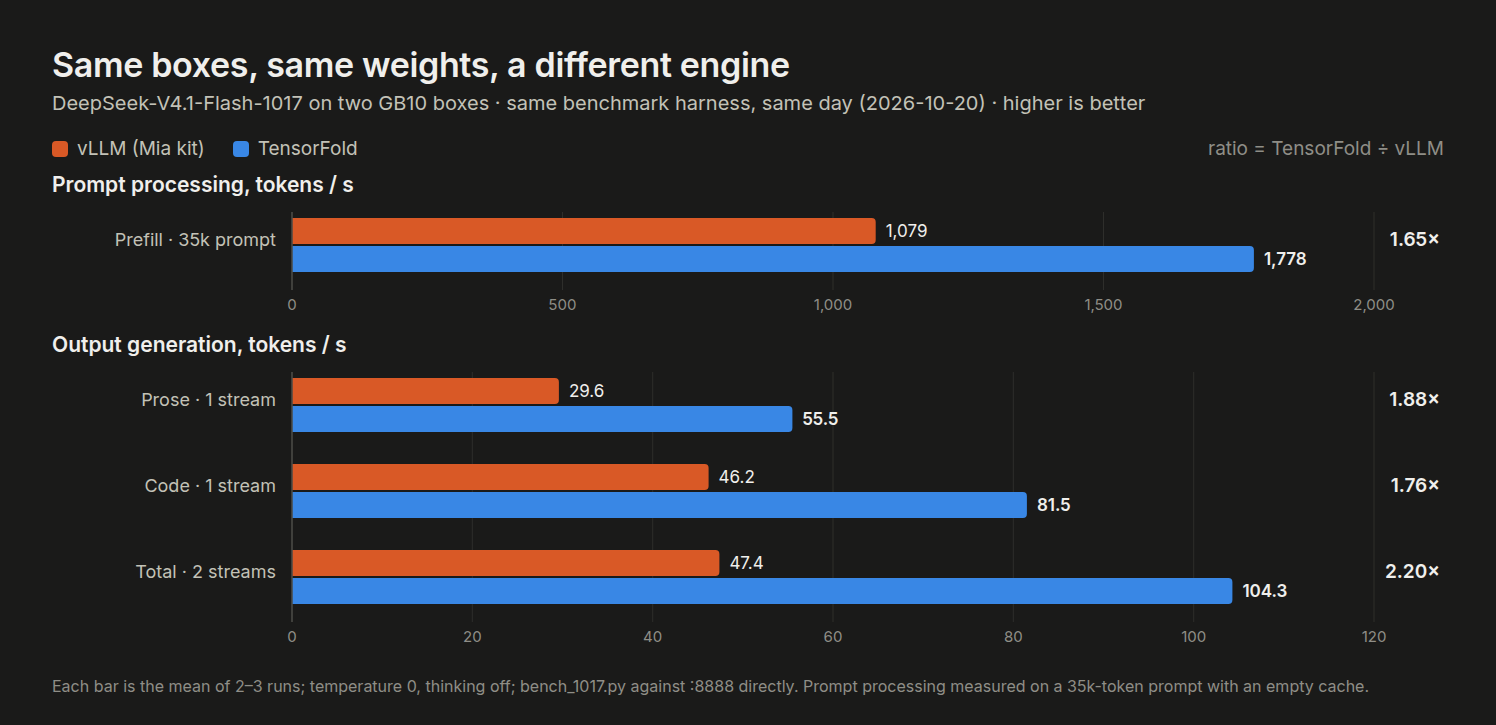
We ran the same benchmark script against both engines on the same day, on the same boxes and the same model files. TensorFold won every row: 1.65× faster prompt processing, 1.76–1.88× faster single-stream generation, and 2.2× with two requests at once.
Benchmarks are one thing. Here is a week of real traffic through our gateway: 12,439 requests between 20 and 26 October, including long agent sessions with prompts up to 145,000 tokens.
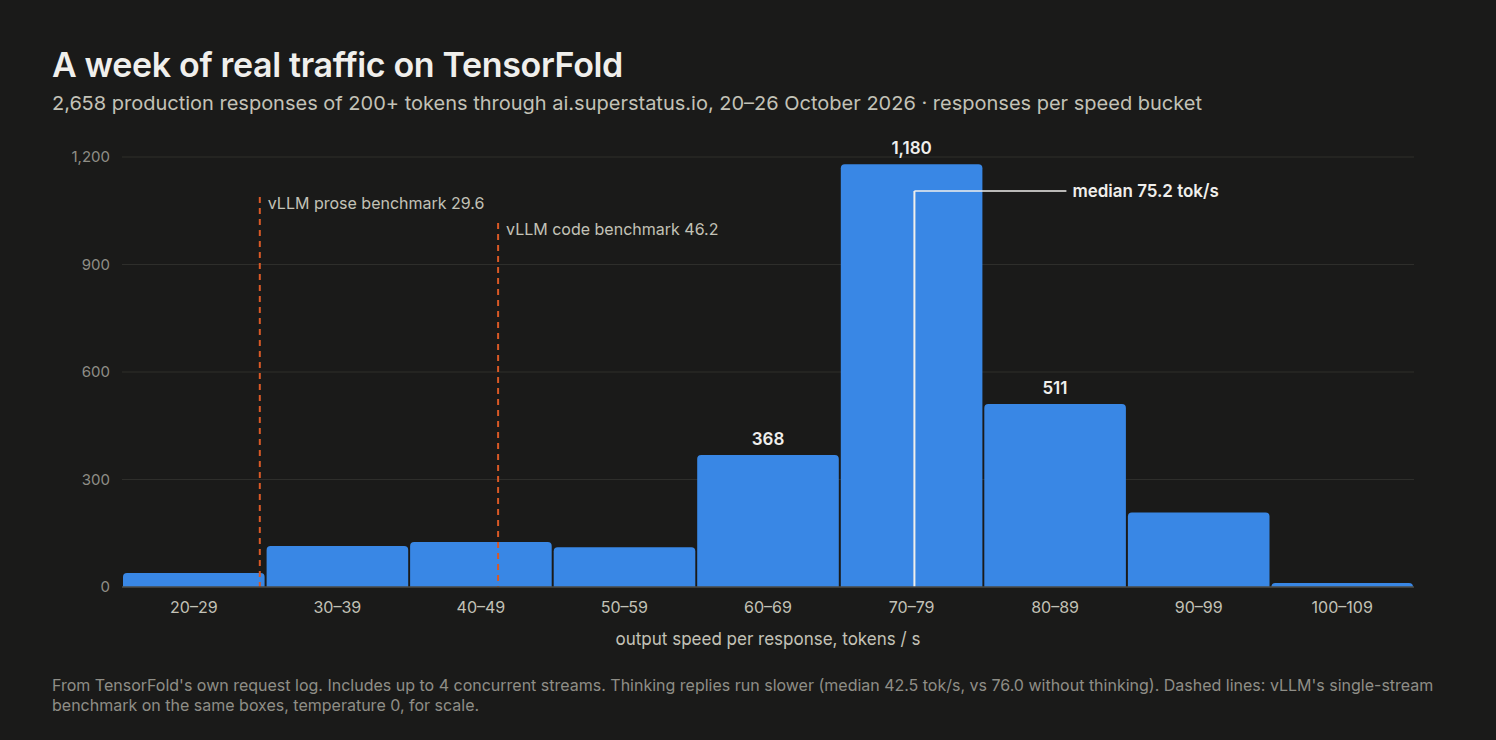
- Output speed: median 75 tok/s per response (76 with thinking off, 42.5 with thinking on). vLLM managed about 30 on prose in the benchmark.
- Prompt processing: median 1,630 tok/s on the part of each prompt that was not already cached.
- Time to first token: median 0.7 s, 90th percentile 3.9 s. The prefix cache served 40 % of all prompt tokens.
- Speculative decoding: 68 % of the drafted tokens were accepted, against 49 % on vLLM with the 1017 weights.
- Stability: no crashes since the memory fix described below. It has run for six days without a single restart.
What you need
- The two-box setup from the first guide: two GB10 boxes, a direct QSFP cable with jumbo frames, and passwordless SSH from the head to the worker.
- About 500 GB free on each box: 385 GB for the 1017 model files and about 110 GB of rank caches written on the first start. If you already have the 1017 files, you only need room for the caches and the image (about 130 GB).
- About 100 GB of free memory on each box, so stop any other model first.
We use Elevatormusic's TensorFold recipe for DGX Spark, which runs its TensorFold fork with the model split across both boxes. Everything is Apache-2.0, and the CUDA extensions are compiled on your own machine.
Part 1: TensorFold on two boxes
Step 1: Get the recipe
git clone \
  https://github.com/Elevatormusic/DeepSeek-V4.1-Flash-1017-EXL3-TensorFold-2x-DGX-Spark \
  ~/tfv41
cd ~/tfv41
cp .env.example .env
Set the cable addresses, the worker's SSH login and the folders in .env. One thing caught us: the recipe uses one network device name for both boxes. On our pair the cable sits in a different port on each box (enp1s0f1np1 on the head, enp1s0f0np0 on the worker). If yours does too, the worker needs its own device names; we added three WORKER_* overrides to start.sh for that.
Step 2: Get the model
# 1017 weights (~385 GB), checked and copied to the worker
scripts/download.sh
scripts/patch_template.py --worker
If you already have the 1017 files on disk, as we did from vLLM, don't download them twice. Build a hard-link view in the layout TensorFold expects instead. It costs no disk space, and your existing integrity checks stay valid because the files themselves don't change:
mkdir -p ~/tfv41-view/model ~/tfv41-view/engram
ln ~/dsv41-1017/model/*      ~/tfv41-view/model/
ln ~/dsv41-1017/engram-src/* ~/tfv41-view/engram/
# then set MODEL_VIEW=~/tfv41-view in .env and run
# scripts/patch_template.py --from <your existing chat template>
The engine also needs the full base model.safetensors.index.json in engram/. If you slimmed that index for vLLM's Engram packing, copy the original back in on both boxes.
Step 3: Build the engine
docker/build.shThis builds the image on the head from NVIDIA's PyTorch base, streams it to the worker, and checks that both sides have the same image ID. It took 15 minutes.
Step 4: Tune the memory. Don't skip this
# both boxes; scripts/host_tuning.sh --undo reverts it
scripts/host_tuning.sh
We skipped this step at first, because it changes the host and vLLM had never needed it. That was the cause of our crashes; see What went wrong. The script turns transparent huge pages off, stops background memory compaction, keeps 1 GB of memory free for the kernel, and makes earlyoom stop the model, not the box, if memory runs out.
Step 5: Start it, then warm it up
# first start ~15–30 min (rank caches + CUDA extensions), later ~80 s
./start.sh
# 5 checks: plain, thinking, JSON schema, forced tool call, regex
./verify.sh
Run verify.sh before you let any real traffic in, every time you start the engine. That is not just a test. See below.

Step 6: Point your gateway at it
It is an OpenAI-compatible API on port 8888 again. We kept vLLM's model name (SERVED_NAME in .env), so our LiteLLM gateway and everything behind it needed no change. Four differences matter if you call it directly:
- Thinking is off by default. Turn it on per request with
"reasoning_effort". - The effort scale is finer: low 50, medium 62, high 75, xhigh 88, max 100. If your gateway pins
xhigh, as ours does, it now means 88 instead of vLLM's 75. Replies still finish faster: median 38 s instead of 98 s on our test prompt. /healthanswers 200 during warm-up. Use/v1/modelsto check that it's ready.- Metrics are named
tensorfold:*, notvllm:*.
Part 2: Keep it running
Like the vLLM setup, the engine runs from one systemd unit on the head, which starts the worker over SSH. Ours runs the boot checks from the first guide (network, jumbo frames, both GPUs idle), verifies the model files, starts the engine, and runs verify.sh before the unit reports as started.
The engine has no restart policy of its own. When one half fails, both halves exit, so supervision has to come from outside. A watchdog timer checks every minute that both containers are running and that /v1/models lists the model:
- A container is gone: it restarts the unit straight away (about 80 s to serving).
- Anything else fails: it restarts after three failed checks in a row.
- The third restart within an hour: it switches back to vLLM instead and raises an alert.
We kept vLLM installed but disabled, so rolling back is a single command.
What went wrong
Crash 1: the first request after images. Our first switch died a minute after going live. Two image requests went through fine, and the next text request brought the engine down with CUDA error: operation not permitted. Setting CUDA_LOG_FILE=stderr showed the real error: Failed to create CPU mapping. It only happened on warm starts, the fast ones that reuse the rank caches, and it happened every time. Our earlier test run never hit it, because it had started cold and run verify.sh first. Running verify.sh before any traffic made the crash go away, so the systemd unit now always does that.
Crash 2: the same error under real load. Two and a half hours later it crashed again with the same error, this time while building a CUDA graph. The watchdog had it back in 90 s. This is when we applied the memory settings from the recipe's tuning script, which we had skipped: huge pages off, compaction off, 1 GB kept free. We left out its earlyoom part. On the GB10 the GPU shares memory with the CPU, and with only a few GB left free, huge pages plus background compaction make mapping new host memory fail now and then. Since the tuning: no crashes and no restarts in six days, and more than 12,000 requests.
So the lesson is simple. The recipe's measured setup includes the host tuning. Treat scripts/host_tuning.sh as part of the install, not as an optional extra.
sparkDash
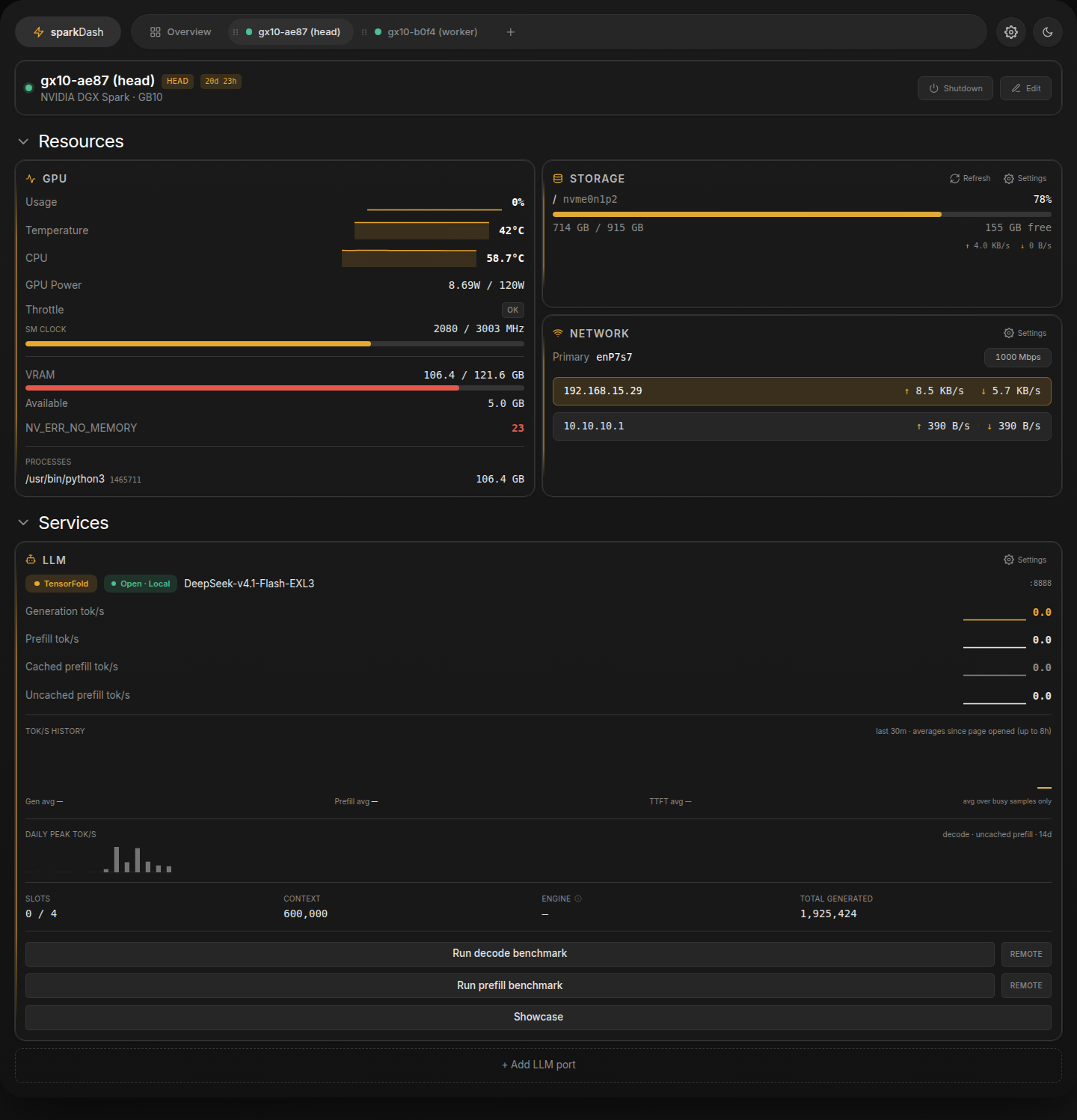
The sparkDash dashboard from the first guide needs v1.8.9 or newer to recognise TensorFold. Older versions read it as a generic EXL3 server, showing one slot and prefill rates inflated by prefix-cache hits. With v1.8.9 you get the TensorFold badge, all four slots and live generation and prefill rates.
What you get
A 552B-parameter model on two desktop boxes that writes at about 75 tokens per second for real users, reads uncached prompts at about 1,600 tokens per second, and holds 600,000 tokens of context. That is twice what the same boxes did a month ago, with nothing changed but the engine.
Thanks to Elevatormusic for the recipe and the fork, to bertholomus for TensorFold, and to Mia's AI Lab for the vLLM kit we ran for a month and still keep as our rollback.
// COMMS