
Guide: images, video and music on one home GPU workstation
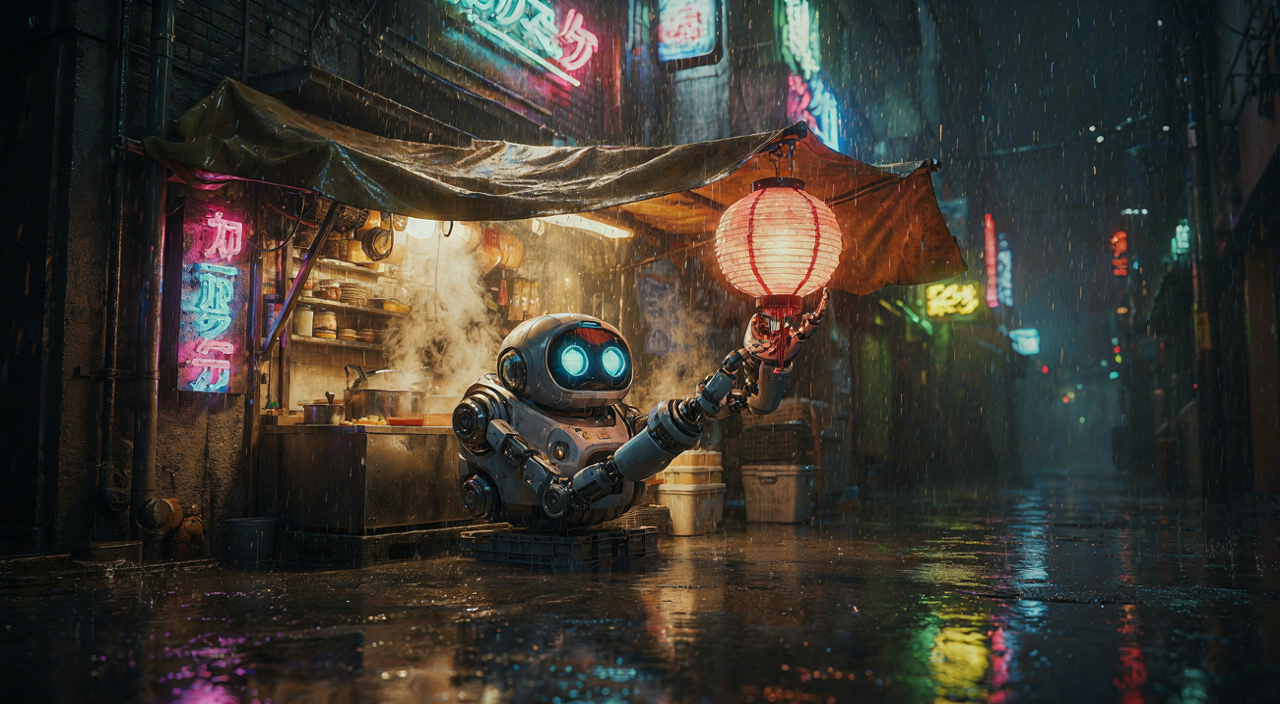
In July I wrote about getting ACE-Step to make actual music on a home RTX 3090. That post is out of date now. ACE-Step is gone, and so is SANA-WM, the video model from the post before it. The same GPU workstation now runs a three-step chain: make a still image, turn it into a five-second video clip with Wan 2.2, and score it with Stable Audio 3 Medium.
This post covers what runs where, what it costs in time and memory, how to set it up yourself, and what the output looks and sounds like. Every image, clip and track below came straight out of the models. Nothing was edited or cherry-picked; each prompt got one try.
The setup
One Windows 10 workstation with three NVIDIA cards. The models run in Ubuntu under WSL2. Each kind of job gets its own card, so a 20-minute video render never holds up a 30-second image.
| Job | Model | Card | Peak VRAM | Time per job |
|---|---|---|---|---|
| Still image, 1280×704 | open-weight image model, 4-bit | RTX 5090, 32 GB | 21 GB | 29–36 s, plus 9–48 s to load |
| Image → 5 s video | Wan 2.2 TI2V-5B, bf16 | RTX 3090, 24 GB | 18.7 GB | about 20 min at 50 steps (≈9 min on a 5090) |
| Music, up to 380 s | Stable Audio 3 Medium | RTX 3090, 24 GB | 9.4 GB | 4–6 s for 45 s of audio, plus 28–53 s to load |
Video and music share the 3090 and take turns on it. The third card, an RTX 3080, runs speech models, which are not part of this post.
Nothing stays loaded between jobs. Each job loads its model, renders, writes its files and exits. That is why load time shows up in the table. It costs some seconds per job. In exchange, the cards sit empty between jobs, and a crashed render cannot leave a half-dead model holding VRAM.
What changed since July
- Music: ACE-Step → Stable Audio 3 Medium. I ran a blind A/B test: ten prompt pairs, the same prompts on both models, files shuffled and renamed so I could not tell which was which. Stable Audio won clearly. ACE-Step also tended to ignore the tempo and key I asked for. Stable Audio follows them; see the measurements below. Stable Audio 3 Medium makes instrumentals only, in 44.1 kHz stereo, from 1 to 380 seconds. It renders in a few seconds on a 3090 and uses 9–10 GB of VRAM, which is less than half of what ACE-Step XL needed.
- Video: SANA-WM → Wan 2.2 TI2V-5B. SANA-WM is a world model: it moves a camera through a scene along a path you give it. That was fun to play with, but I rarely needed it. I wanted to give it a still and have the scene come alive. Wan 2.2 does that, and it can also generate a clip from text alone. It is Apache-2.0, has five billion parameters, and its 5-second clips fit on a 24 GB card in bf16.
- Images: a newer open-weight model replaced SANA 1.5. It is clearly better at text, faces and composition. Its licence is non-commercial, so for your own setup see Step 1 for options.
The samples
Images
Five prompts, one render each, seed 7, the default 20-step preset, rendered at 1280×704 so they can go straight into the video model. Each took 29–36 seconds on the 5090.
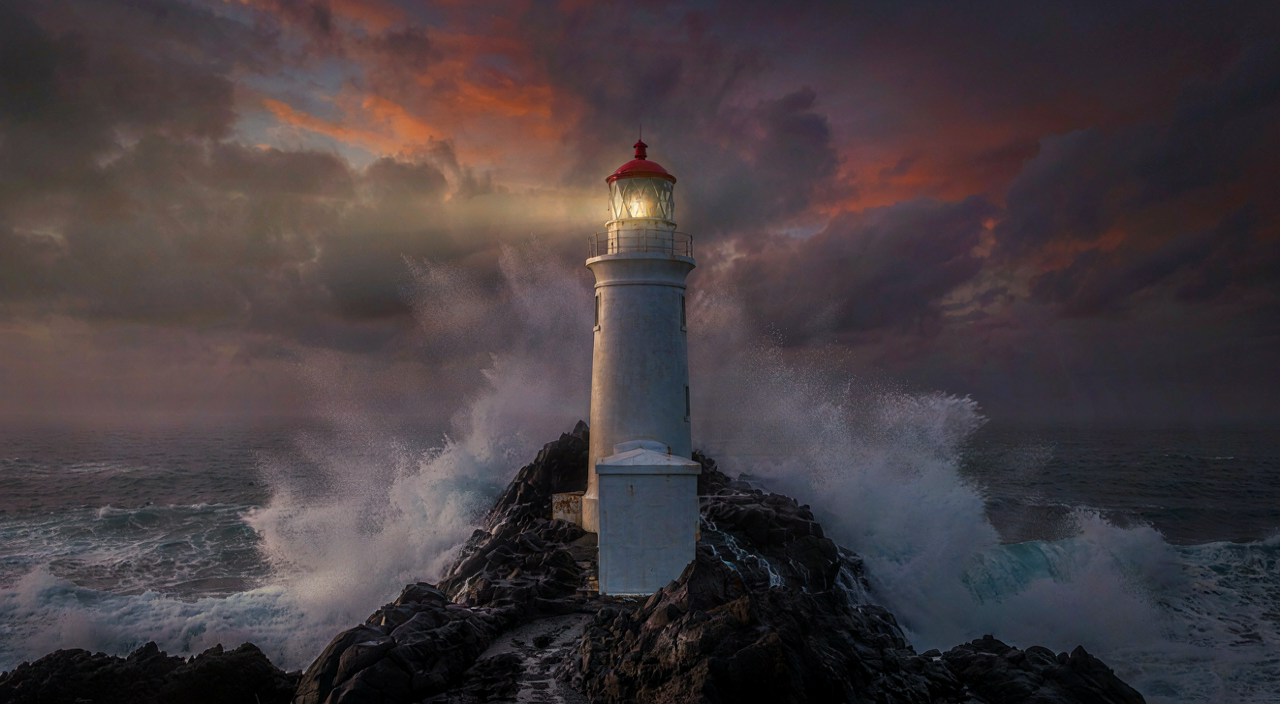
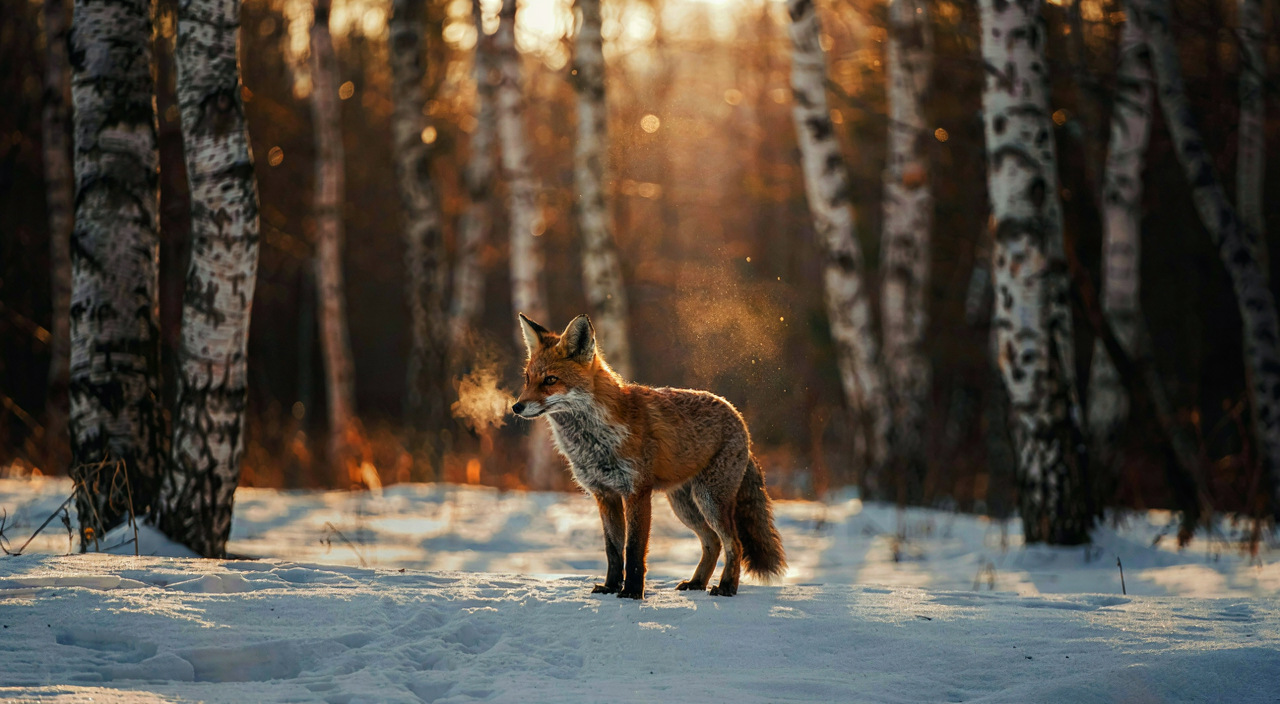

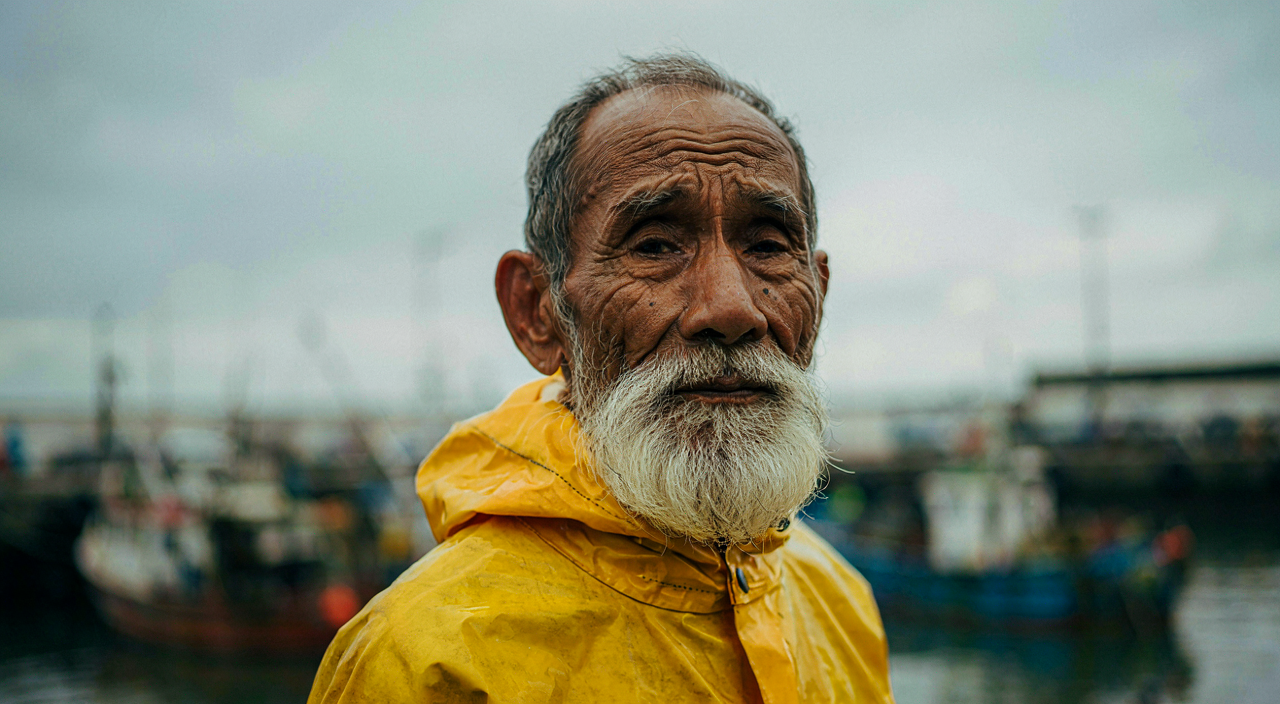
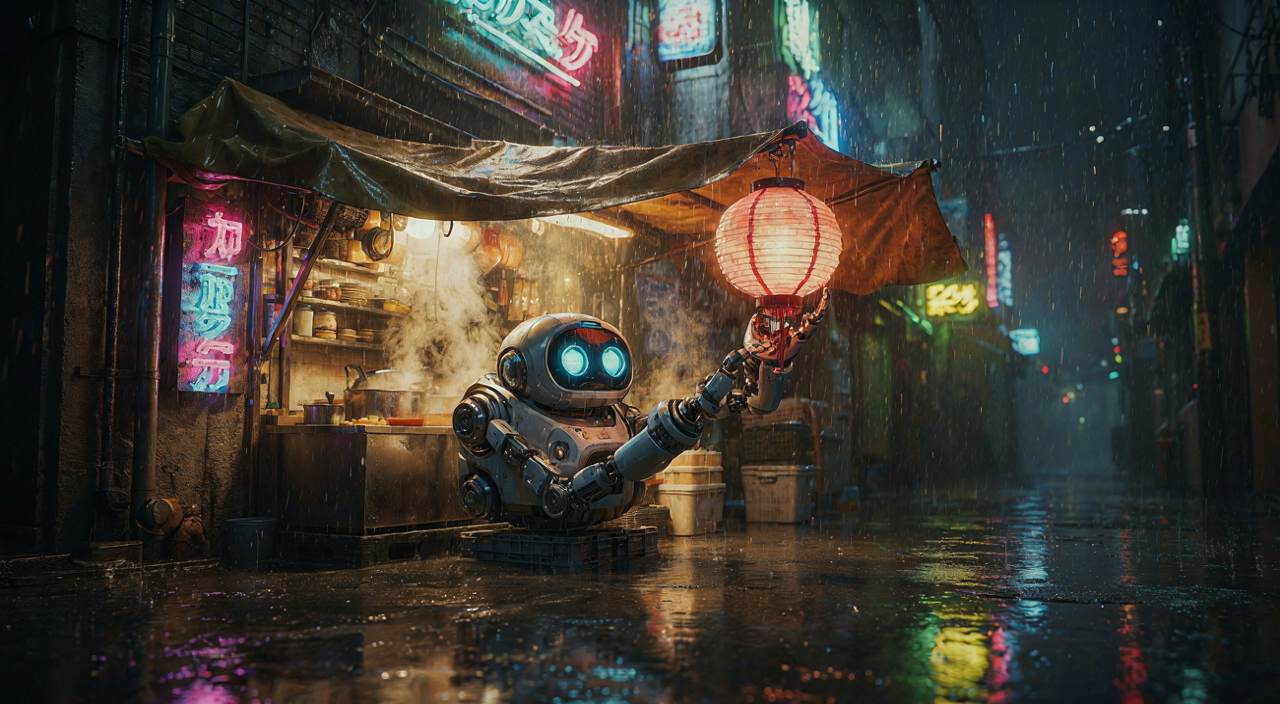
Image → video
Three of the stills, animated with Wan 2.2. Each clip had a short prompt describing the motion only. The image already sets the scene. Settings: 121 frames at 24 fps, 50 steps, guidance 5.0, seed 7.
The robot clip at the top of the post is the third one. All three took 20.4–20.7 minutes on the 3090: 35 s to encode the prompt, 50 s to load the model, 16 minutes of denoising and 2.5 minutes of VAE decode. Peak usage was 19.3 GB of the 24 GB.
What works: the first frame stays intact. The lighthouse, the robot and the fox keep their shape, colours and details for the whole clip. Water, rain, steam and fur move believably, and the fox really does turn to the camera. What does not work as well:
- Not every instruction lands. The lighthouse beam was supposed to sweep across the sea. It stays where it is, and the waves do all the moving.
- Small effects get exaggerated. The fox's "small cloud of mist" grows into a big glowing plume by the last second.
- Five seconds is the limit per clip with this model. A longer scene means several clips.
Music
Four prompts, 45 seconds each, 8 steps, CFG 1.0, seed 1234. Each one rendered in 3.5–5.8 seconds on the 3090. These are the raw files with no mastering, encoded to MP3 for the web.
To see whether the model follows the tempo and key in the prompt, I ran every track through a standard beat tracker and key estimator (librosa):
| Track | Asked for | Measured tempo | Measured key |
|---|---|---|---|
| Lo-fi | 84 BPM, A minor | 83.4 BPM | A minor ✓ |
| Synthwave | 108 BPM, E minor | 107.7 BPM | E minor ✓ |
| Orchestral | 96 BPM, D minor | 95.7 BPM | D minor ✓ |
| Jazz | 120 BPM, B♭ major | 117.5 BPM | unclear |
All four tempos are within 2 % of the request. Three of the four keys match. The jazz track moves through too many chords for a simple key estimator to settle on one. ACE-Step never managed this reliably for me, and it is the main reason I switched.
Set it up yourself
What you need
- Video: an NVIDIA card with 24 GB (a 3090 or 4090 is fine; on a 5090 it is about twice as fast). About 32 GB of disk for the Wan weights.
- Music: 10 GB of VRAM is enough. About 10 GB of disk, and a Hugging Face account, because the weights are gated. Accept the terms on the model page first.
- Images: depends on the model. 16–24 GB covers the current open models at 4-bit or 8-bit.
- Linux, or WSL2 on Windows. Native Linux is simpler; WSL2 has a few traps, listed under What bit us. Python 3.12 for Wan and 3.10 for Stable Audio. uv makes the separate environments painless.
Give each model its own Python environment. Wan wants torch 2.9 with CUDA 12.8, while Stable Audio's lockfile pins torch 2.7 with CUDA 12.6. Putting both in one environment will break one of them.
Step 1: The still
Wan does not care where the first frame comes from. It needs a still at 1280×704 for landscape or 704×1280 for portrait. Any other size works too, but it gets cropped to that aspect ratio. You can use a photo, a render, or an image from any text-to-image model.
Our image model has a non-commercial licence, so I would not tell you to build on it. If you want a licence that allows commercial use, Z-Image Turbo (Apache-2.0, 6B, runs through diffusers) is where I would start. I have not run it in this chain, though.
One lesson carries over to any model: describe the picture, not just the vibe. Our model works from a structured caption that lists the background and each element with its position. A plain one-line prompt gives it too little to work with. So a local LLM rewrites each prompt into that structure before rendering. The five images above all went through that step. Even when a model accepts plain prompts, a longer description of the layout makes a better first frame. The first frame decides most of what the video can become.
Step 2: Install Wan 2.2
uv venv ~/wan-venv --python 3.12 --seed
source ~/wan-venv/bin/activate
pip install torch==2.9.1 torchvision==0.24.1 \
  --index-url https://download.pytorch.org/whl/cu128
pip install diffusers==0.38.0 transformers==4.57.6 \
  accelerate ftfy sentencepiece protobuf \
  "imageio[ffmpeg]" pillow
hf download Wan-AI/Wan2.2-TI2V-5B-Diffusers
No flash-attn and no CUDA toolkit needed: attention runs through PyTorch's built-in SDPA. The download is about 32 GB, most of it the UMT5-XXL text encoder.
Step 3: The image-to-video script
Calling the pipeline the normal way would keep the text encoder, the transformer and the VAE on the card together. That does not fit in 24 GB. The script below runs them one at a time, in three phases:
- Encode the prompts with the UMT5 text encoder, then delete it.
- Denoise with the transformer, and stop at latents instead of decoding.
- Move the transformer off the card, then let the VAE decode in 512-pixel tiles with the whole card to itself.
import gc, sys, torch
from PIL import Image
from diffusers import WanImageToVideoPipeline
from diffusers.utils import export_to_video
from transformers import AutoTokenizer, UMT5EncoderModel

M = "Wan-AI/Wan2.2-TI2V-5B-Diffusers"
W, H, FRAMES, STEPS = 1280, 704, 121, 50
image = Image.open(sys.argv[1]).convert("RGB").resize((W, H))
prompt = sys.argv[2]
negative = "static, blurred details, worst quality, deformed"

# 1. Encode both prompts, then free the text encoder.
tok = AutoTokenizer.from_pretrained(M, subfolder="tokenizer")
enc = UMT5EncoderModel.from_pretrained(
    M, subfolder="text_encoder", torch_dtype=torch.bfloat16,
    device_map={"": "cuda"})

def embed(text):
    t = tok(text, padding="max_length", max_length=512,
            truncation=True, return_tensors="pt").to("cuda")
    with torch.no_grad():
        h = enc(t.input_ids, attention_mask=t.attention_mask)
    return h.last_hidden_state * t.attention_mask[..., None]

pe, ne = embed(prompt), embed(negative)
del enc
gc.collect(); torch.cuda.empty_cache()

# 2. Denoise to latents with the transformer.
pipe = WanImageToVideoPipeline.from_pretrained(
    M, text_encoder=None, tokenizer=None,
    torch_dtype=torch.bfloat16).to("cuda")
latents = pipe(
    image=image, prompt_embeds=pe, negative_prompt_embeds=ne,
    height=H, width=W, num_frames=FRAMES,
    num_inference_steps=STEPS, guidance_scale=5.0,
    generator=torch.Generator().manual_seed(7),
    output_type="latent").frames

# 3. Drop the transformer, then decode in 512 px tiles.
pipe.transformer.to("meta")
gc.collect(); torch.cuda.empty_cache()
vae = pipe.vae
vae.enable_tiling(
    tile_sample_min_height=512, tile_sample_min_width=512,
    tile_sample_stride_height=448, tile_sample_stride_width=448)
shape = (1, vae.config.z_dim, 1, 1, 1)
mean = torch.tensor(vae.config.latents_mean).view(shape)
std = torch.tensor(vae.config.latents_std).view(shape)
latents = latents.to(vae.dtype)
latents = latents * std.to(latents) + mean.to(latents)
with torch.inference_mode():
    video = vae.decode(latents).sample
frames = pipe.video_processor.postprocess_video(
    video, output_type="pil")[0]
export_to_video(frames, "clip.mp4", fps=24)
python wan_i2v.py fox.png \
"The fox turns its head and breathes out a small \
cloud of mist, fine snow drifts"I ran this script on the 3090 before publishing, with the step count cut to 10. It finished in 7.5 minutes and peaked at 18.8 GB, and the clip was valid: 121 frames at 1280×704. At the full 50 steps, plan on about 20 minutes per clip. The latents.to(vae.dtype) line matters: the pipeline returns float32 latents, the VAE is bf16, and without the cast the decode fails with Input type (float) and bias type (c10::BFloat16) should be the same.
Keep the motion prompt short and about movement: what moves, how, and what the camera does. The image already fixes how everything looks. If you describe the scene again in the prompt, the model may try to repaint it.
Step 4: Install Stable Audio 3 Medium
Accept the terms on the model page first, and log in with hf auth login. Then:
git clone https://github.com/Stability-AI/stable-audio-3 ~/sa3
cd ~/sa3
uv venv .venv -p 3.10 --seed
uv sync
# flash-attn 2.6.3, prebuilt for torch 2.7 / cu126 / py3.10:
uv pip install "$FLASH_ATTN_WHEEL_URL"
uv pip install soundfile
hf download stabilityai/stable-audio-3-medium
Do not skip flash-attn. Without it, the Medium model still runs and still writes a file, but the file is pure static. Building flash-attn from source takes ages and a lot of RAM. A prebuilt wheel that matches your torch, CUDA and Python versions is much easier. We use the 2.6.3 build from mjun0812/flash-attention-prebuild-wheels. It is a third-party binary, so check its sha256 before installing it.
Step 5: Make music
import soundfile as sf
from stable_audio_3 import StableAudioModel

model = StableAudioModel.from_pretrained("medium", device="cuda")
sr = model.model_config["sample_rate"]   # 44100
audio = model.generate(
    prompt="Lo-fi hip hop beat, dusty drums, warm Rhodes "
           "piano chords, vinyl crackle, 84 BPM, A minor",
    negative_prompt="vocals, singing, speech, distortion",
    duration=45, steps=8, cfg_scale=1.0, seed=1234,
    truncate_output_to_duration=True)
pcm = audio.squeeze(0).float().cpu().numpy()   # (channels, n)
sf.write("track.flac", pcm.T, sr)
print("sr", sr, "shape", pcm.shape)
This script also ran on the 3090 before publishing: 55 seconds end to end, most of it loading the model, for a 45-second stereo FLAC. generate() returns a tensor shaped (batch, channels, samples). The sample rate is in model_config; the model object has no sample_rate attribute.
What makes the prompts work:
- Always include BPM and key in the prompt text. The model follows them, as the table above shows. Without them it picks its own.
- List the instruments and the production style ("dusty drums", "gated reverb snare"). Genre names alone give generic results.
- 8 steps and CFG 1.0 are the model's reference settings. Going to 50 steps took the render from about 3 s to 13 s.
- A negative prompt of
vocals, singing, speechkeeps out half-sung syllables. - Longer than 120 seconds? Pass a larger
sample_sizetogenerate()as well. The default buffer holds 120 s, and anything longer is cut off without warning. Set it to at least (seconds + 6) × 44,100 samples.
What bit us
- Under WSL2, CUDA does not run out of memory. It spills. On native Linux, asking for more VRAM than the card has raises an OOM error. Under WSL2 the driver quietly moves the overflow into host RAM over PCIe and keeps going, much slower. Decoding a Wan clip in one piece "reserved" 48 GB on a 24 GB card and took 795 s instead of 155 s, without a single error. Check the peak reserved memory after a run. If it is larger than the card, the job spilled.
- The VAE decode was slow because of how many GPU calls it made, not how much math it did. With diffusers' default 256-pixel tiles, the decode took about 600 s on the 3090, and about the same on the 5090, even though the 5090 is about three times faster. The time went into thousands of small GPU calls, each one paying the WSL2 overhead. 512-pixel tiles cut it to 155 s. 704-pixel tiles spilled past 24 GB and took 289 s.
- Storing the Wan weights in fp8 halves the memory, but under WSL2 the render ran ten times slower. The GPU sat at 3–12 % while one CPU core did the converting. Use bf16 if it fits.
- Do not set
PYTORCH_CUDA_ALLOC_CONF=expandable_segments:Trueon WSL2. It crashed the VAE decode withCUDA driver error: unknown error. - Raise
ulimit -n. The default limit of 1024 open files ran out during the decode and cleanup. - Pin each service to a GPU by UUID, not by index. When we added the third card, the CUDA index numbers shifted. Every service started on the wrong card, and the image model landed on the 10 GB card, where it could not load.
CUDA_VISIBLE_DEVICESaccepts the UUIDs fromnvidia-smi -L, and those never change. - Use a lock when jobs share a card. Video and music take turns on the 3090 under one
flocklock file. Whatever renders holds the lock, and anything else waits. It takes one line in a shell script and prevents two models from loading onto the same 24 GB at once. - Check that the audio is actually music. A broken flash-attn install produces static with a normal exit code. We compute the spectral flatness of every render (close to 1.0 for noise, under 0.3 for music) and fail any job above 0.6. All four tracks above scored below 0.01.
What you get
You get a still in about 30 seconds and a five-second clip in about 20 minutes on a 2020-era RTX 3090. A 45-second soundtrack takes less time to render than to load. All of it runs on one machine under the desk. No API bill, no upload, no queue except your own.
The video step is still the slow one. Five seconds is short, and Wan 2.2 is the newest Wan you can run locally; versions 2.5 and later are API-only so far. The audio step is not slow at all. For music, local generation is now good enough that the model is no longer the weak link. Writing a good prompt is.
All images, clips and music in this post were generated on our own GPU workstation.
// COMMS