
BattleLab v0.18.0: see what your AI coding agent changed
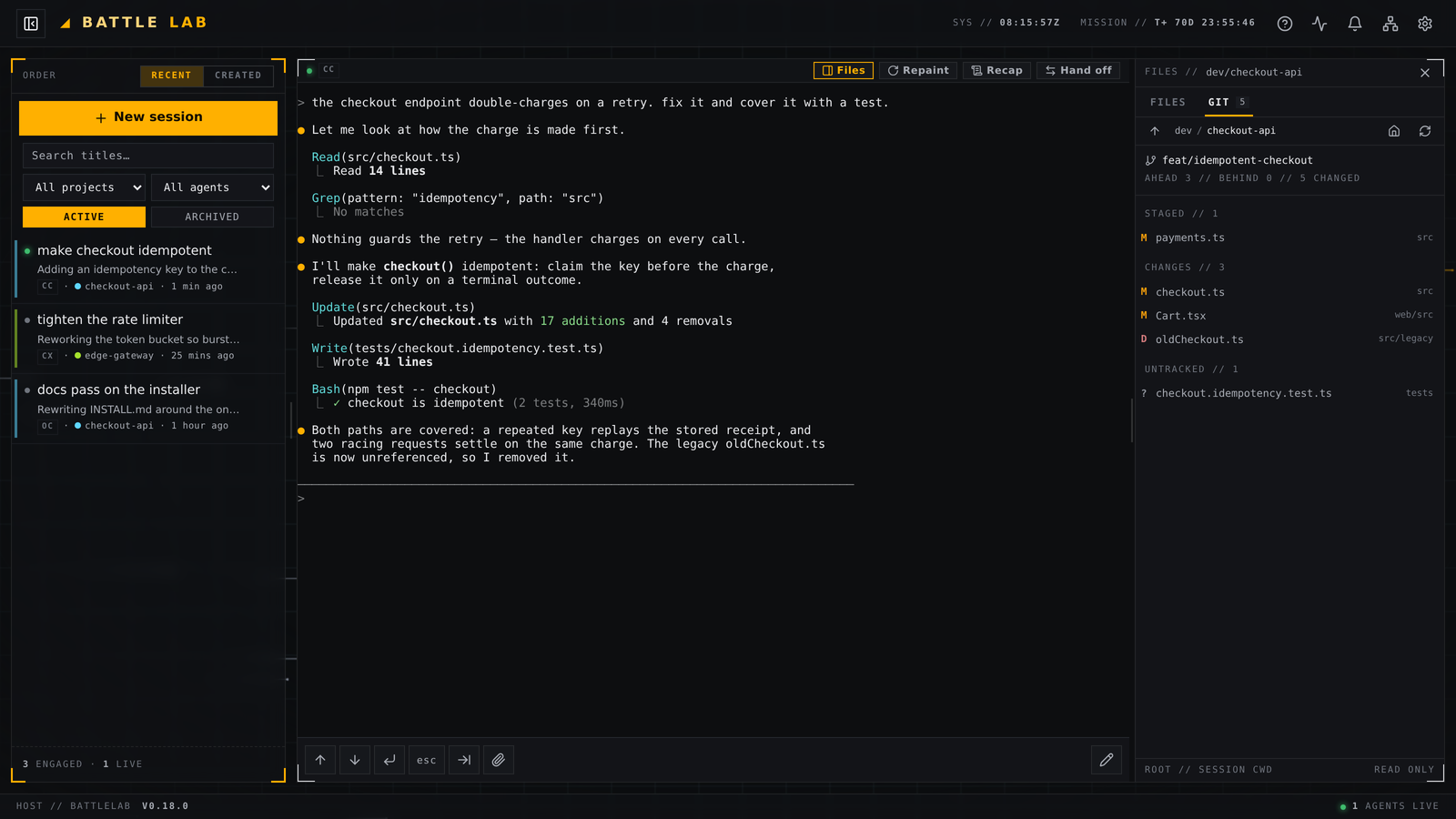
Your AI coding agent finishes a task and tells you what it did: “Updated src/checkout.ts with 17 additions and 4 removals.” Good. Now go and check it. Scroll back through the transcript, ask the agent to cat the file back at you, or leave the app entirely and open the repository somewhere else.
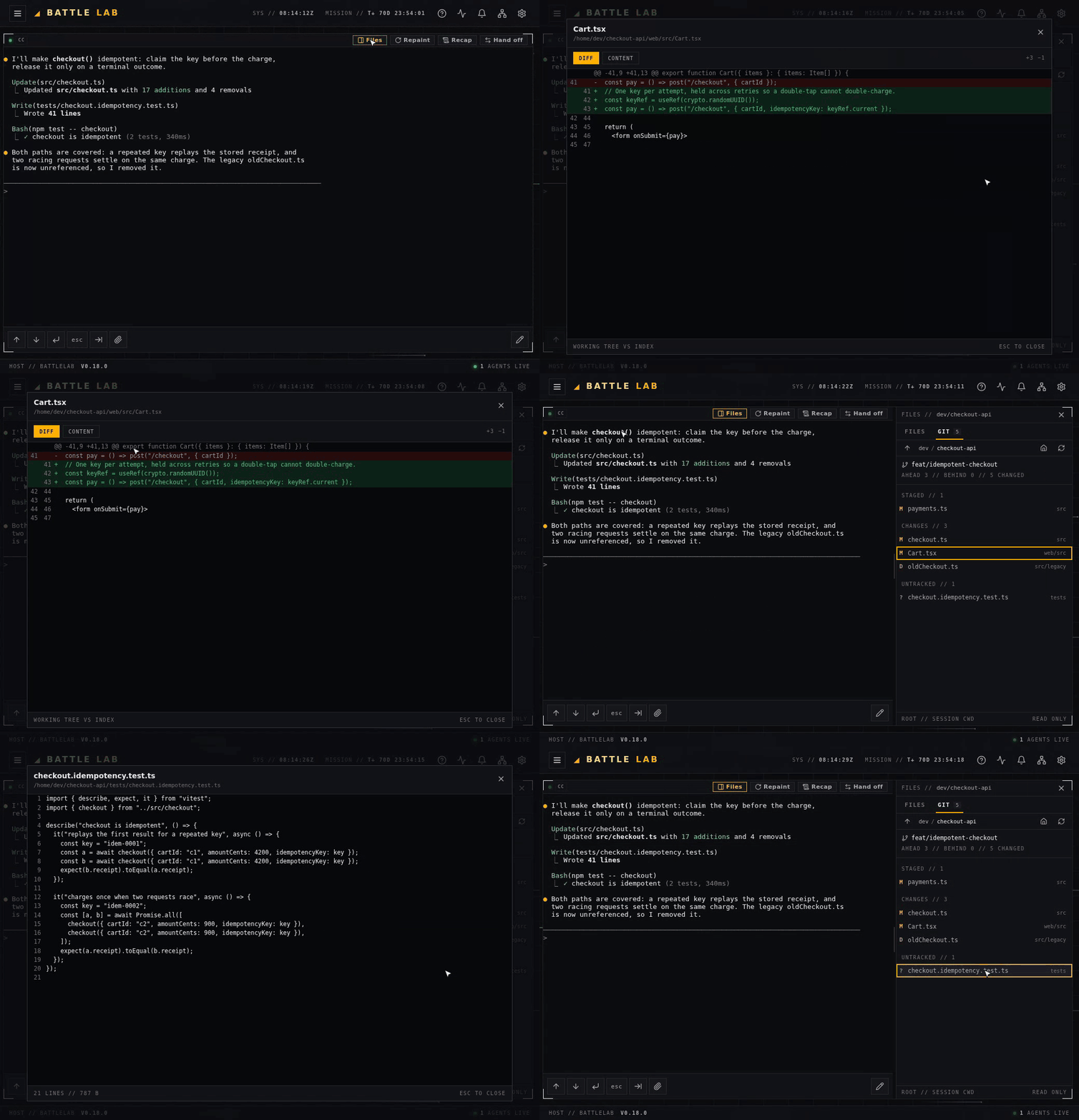
BattleLab v0.18.0 removes that detour. Every session pane now carries a FILES panel rooted at that session’s own working directory, and a GIT tab that lists the paths that have changed in its working tree — with the diff one click away. Read-only, on your desktop and on your phone.
A file browser that already knows where to look
Press Files in a session’s header and a panel docks to the right of the terminal, rooted at the folder that session is actually working in. Nothing to type, nothing to configure — BattleLab already tracks each session’s working directory, so the tree opens where the work is.
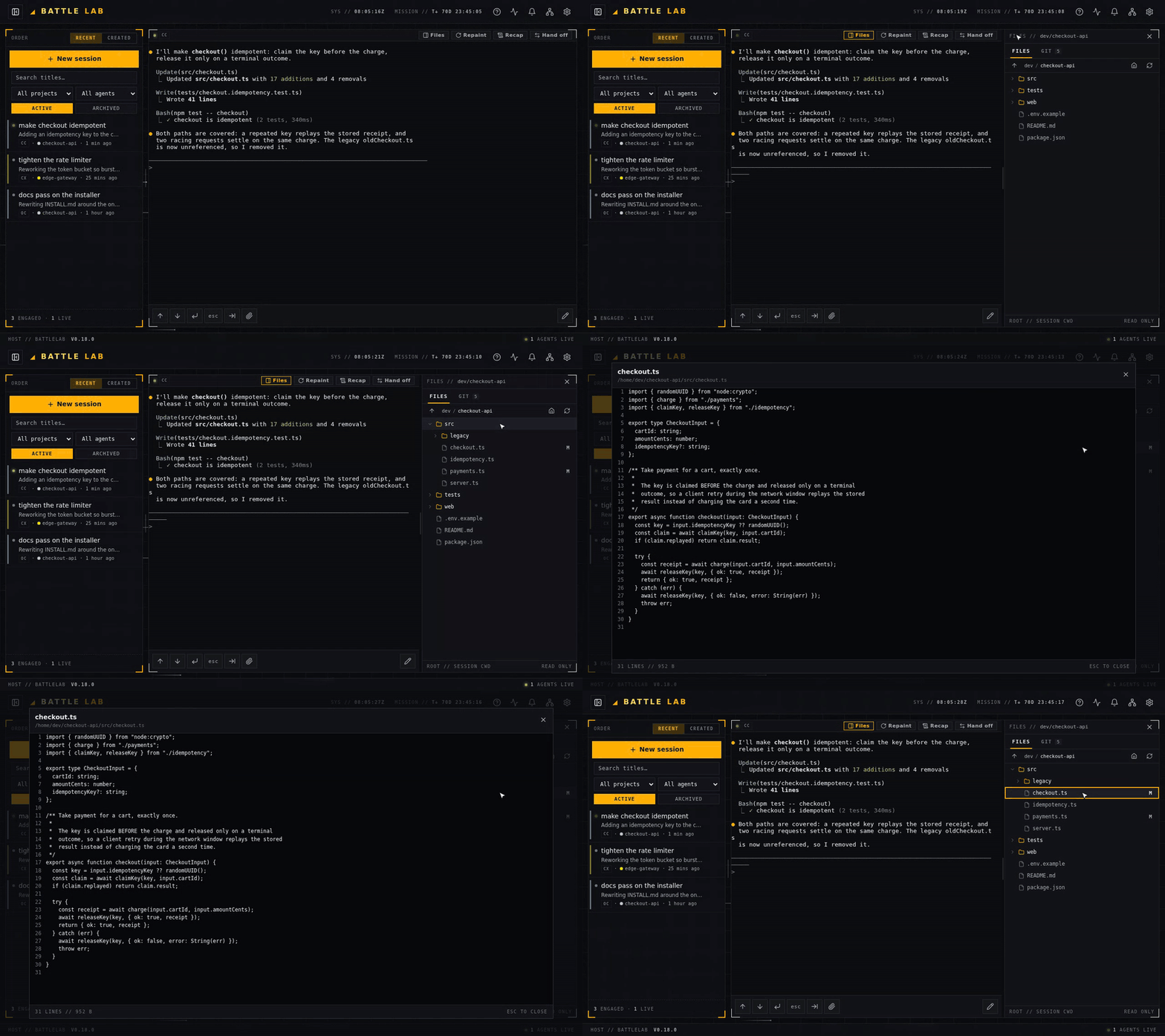
- Lazy expansion. Opening a folder fetches that folder — never a recursive crawl of your home directory.
- Re-rootable. Click a breadcrumb, step up a level, jump to your home directory, or snap straight back to the session’s folder.
- An honest viewer. Files open with line numbers; binary and oversized files say what they are instead of dumping garbage at you.
- Quietly current. Expanded folders re-list every 15 seconds while the panel is open and the tab is visible — and stop the moment it isn’t.
- Dotfiles included. A developer file browser that hides
.envand.gitignoreis lying about the directory.
A GIT tab that tells you what changed
Switch to GIT and the same panel becomes a review surface. The branch sits at the top with how far ahead of or behind its upstream you are — AHEAD 3 // BEHIND 0 — and the number of changed paths, badged on the tab itself so you can still see it while you are browsing files.
Changed paths are grouped Conflicts, Staged, Changes and Untracked. Conflicts sort first, because a conflict blocks everything else. Each row carries git’s own status letter, the filename first and its parent directory dimmed behind it — so a path fifteen folders deep still reads at panel width instead of scrolling sideways.
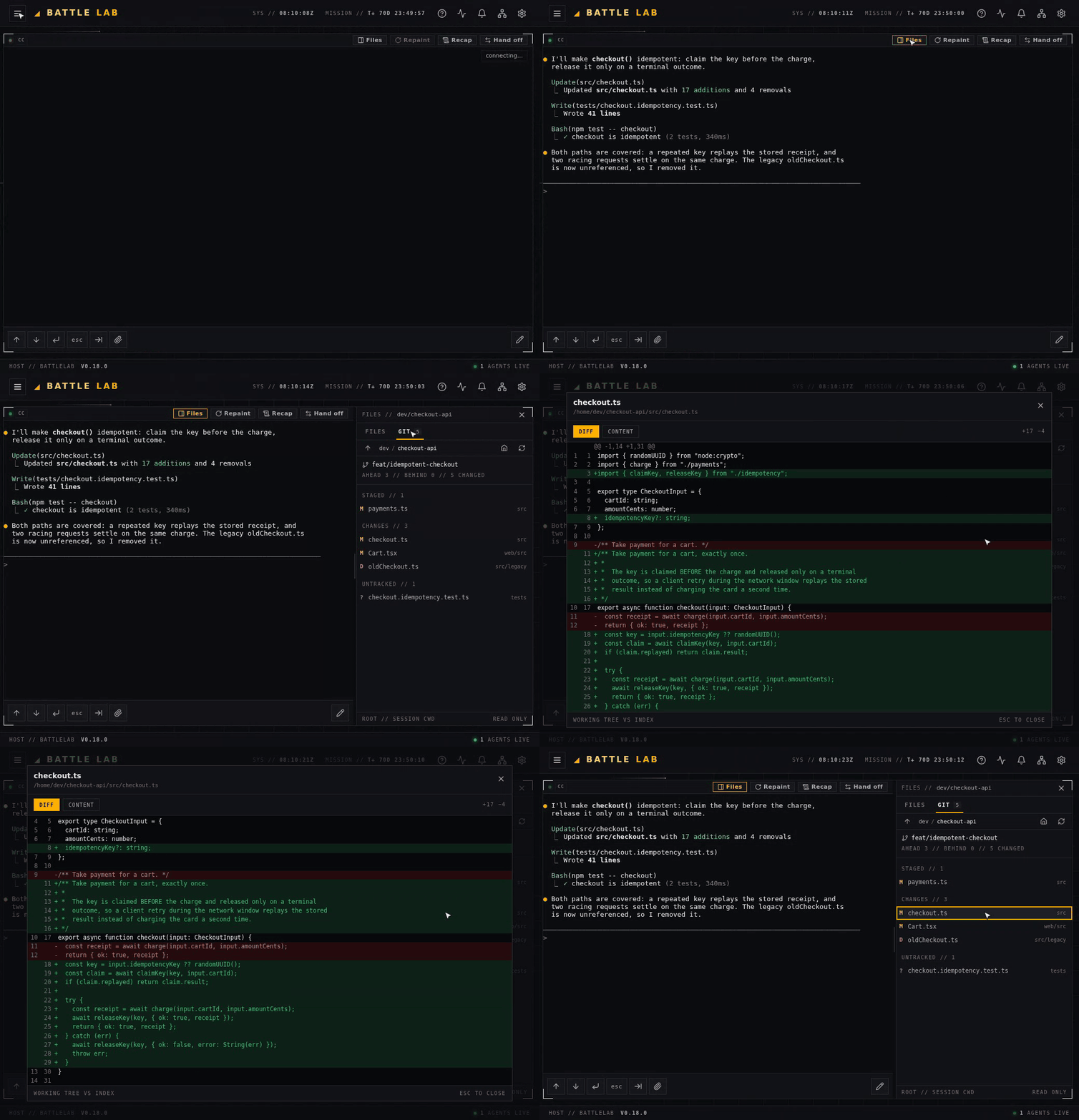
This is git’s own view of the working tree, so it shows everything that changed in that repository — your own edits included, not only the agent’s. In practice that is the point: when you come back to a session, the question is what the working tree looks like now.
The same status letters ride along in the FILES tree, so browsing the project and reviewing the change are one surface rather than two places to look.
One row, two ways to read it
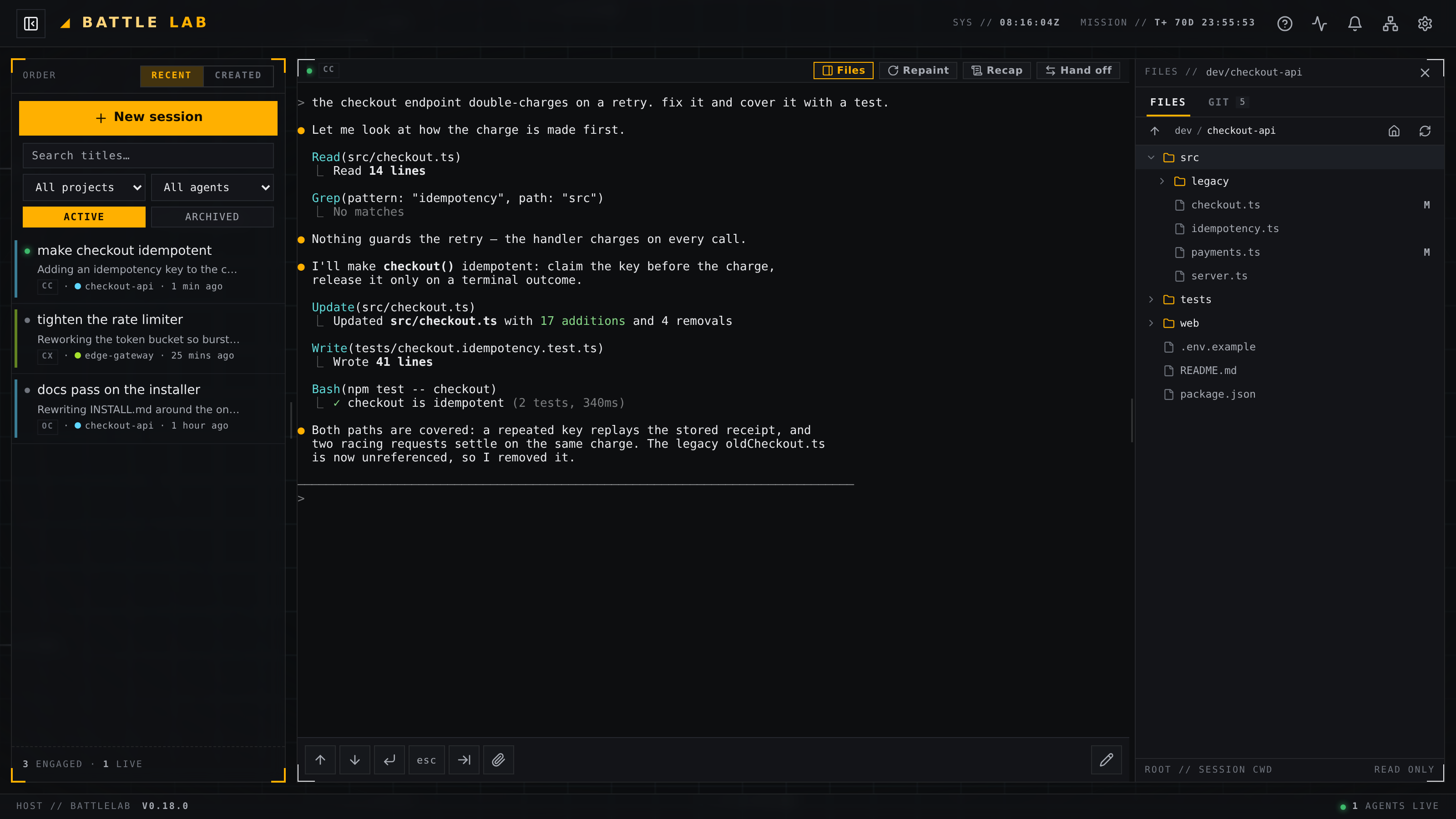
A changed path opens as a unified diff: old and new line numbers in separate gutters, additions and removals in the app’s own status colours, and the +17 −4 totals in the corner. Flip to CONTENT to read the file exactly as it stands right now.
A mode that doesn’t apply is absent, not greyed out — a control you can press to no effect is worse than no control. A brand-new untracked file has no diff to show, so there is no DIFF button at all. A deleted file has nothing left to read, so there is no CONTENT button. A merge conflict opens on CONTENT, because the markers are what you resolve against, and its diff compares the two sides you are actually merging.
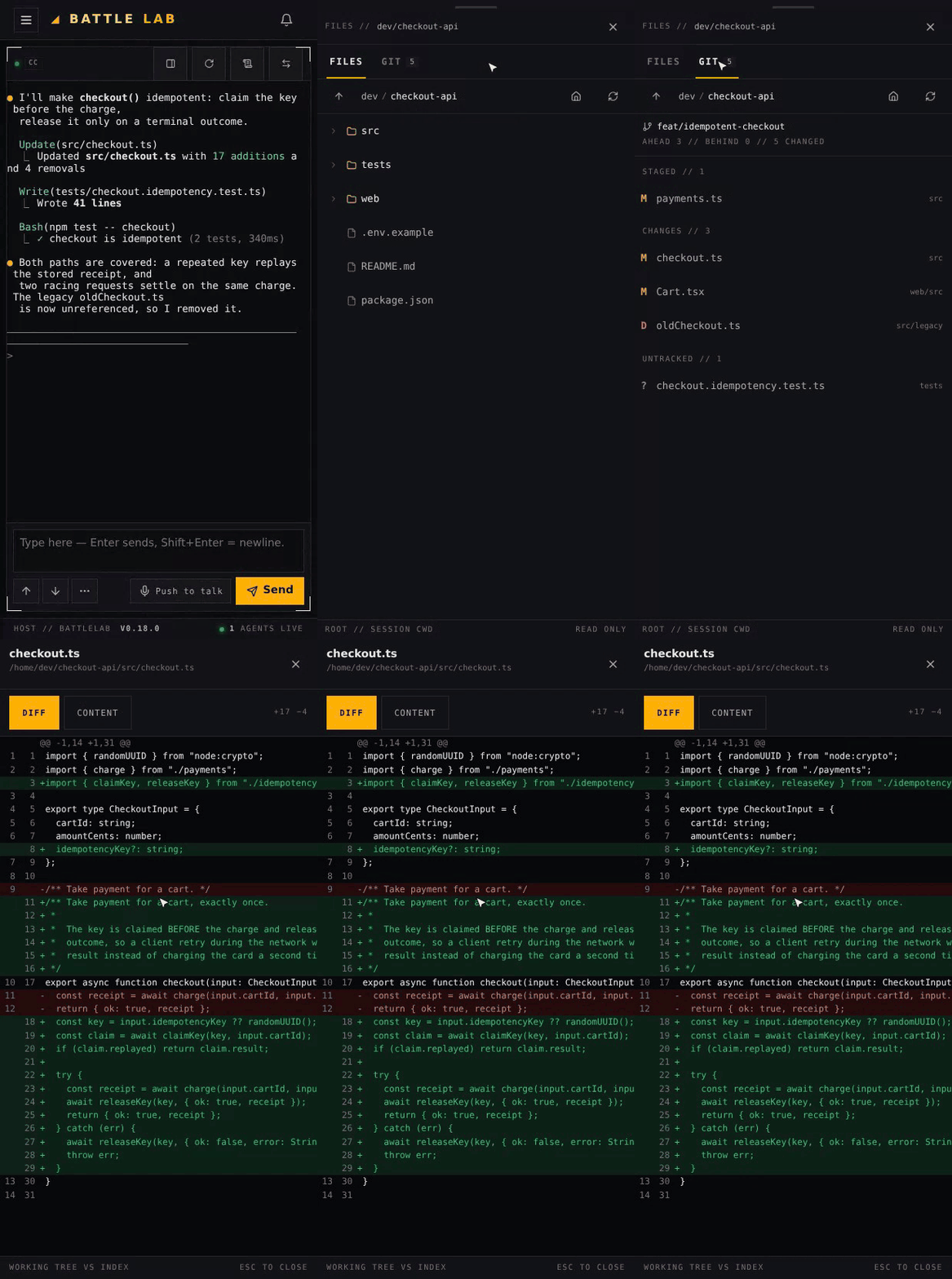
The same review, on your phone
BattleLab is a phone-first tool, and the panel keeps that promise. Whether it docks as a column or takes over as a full-screen sheet is decided by measuring how much room the session pane actually has — not by guessing from the viewport — so a narrow window on a laptop gets the sheet too. Every row, tab and control the panel owns is a real 44-pixel touch target, and the sheet sits above the terminal’s own touch-capture layer so your taps land where you aimed them.
Read-only — and hardened on purpose
There is no stage, no commit, no discard, no checkout. The panel reads; your agent writes. That is the entire contract, and most of the engineering went into keeping it honest.
BattleLab never runs git diff. That is an odd thing to boast about, so here is why. A git repository’s own configuration can name programs that git will cheerfully execute during a perfectly ordinary read: a textconv driver, an external diff program, a core.fsmonitor hook, or a filter.* clean driver. The first three can be switched off with flags. The last one cannot — measured on git 2.43, a filter.clean script still ran under --no-textconv --no-ext-diff. And these are repositories your AI agent has write access to, so “the repo’s config is trusted” is not an assumption available here.
So the request path uses exactly three read-only git subcommands — rev-parse, status and cat-file — each invoked as a literal argument list with a scrubbed environment, and the diff is assembled in Python from the blob as git stored it plus a descriptor-verified read of the file on disk. The test suite plants marker scripts in all four hook positions and fails the build if any of them ever executes.
The rest of the contract, briefly:
- Your agent’s git is never disturbed. Every call carries
--no-optional-locksandGIT_OPTIONAL_LOCKS=0, so a panel polling in the background cannot refresh the on-disk index while your agent is mid-commit. - Nothing escapes your home directory — including git’s own metadata. A
.gitfile pointing at an external directory, an external common-dir, and outside object alternates are each refused before git is invoked at all. - Nothing is cached. Diffs and file reads carry file bytes, and directory listings carry absolute paths, so every response — success and error alike — is sent
Cache-Control: no-store. - Your terminals stay fast. All filesystem and git work runs off the event loop on the panel’s own bounded thread pool, so a huge repository cannot make typing sluggish in some other session.
- Not a repository is a state, not a failure. Point the panel at a folder that isn’t a working tree and the tab says so, rather than vanishing. A working tree with more changed paths than the panel will list is the same deal: it is capped, and it tells you it was truncated instead of quietly showing you a prefix.
Getting v0.18.0
Already running BattleLab? The in-app updater under Settings → System → Updates will pick it up, or run agent-sessions autoupdate from the shell.
New here? One line, rootless, no system daemon, no root:
curl -fsSL https://battlelab.superstatus.io/install.sh | shBattleLab is self-hosted and AGPL-3.0 — your sessions, your repositories and your diffs never leave your box. If you are new to it, start with one deck for every AI coding agent for the full tour, or read about handing a live coding session to a different AI agent — Claude Code to Codex, mid-task, with the context intact.
// COMMS